Miss Neally Font: Elegant Script for Small Business Branding
When you run a small business, every piece of customer-facing material matters. Your logo, product labels, social media posts, and packaging all speak before you do. The typeface you choose can either strengthen that message or weaken it. Miss Neally is a monoline script font created by Situjuh Nazara that brings a smooth, elegant feel to any brand. If you are looking for a way to make your business look more polished and consistent without overhauling your entire identity, this font deserves a closer look.
What Makes Miss Neally Stand Out
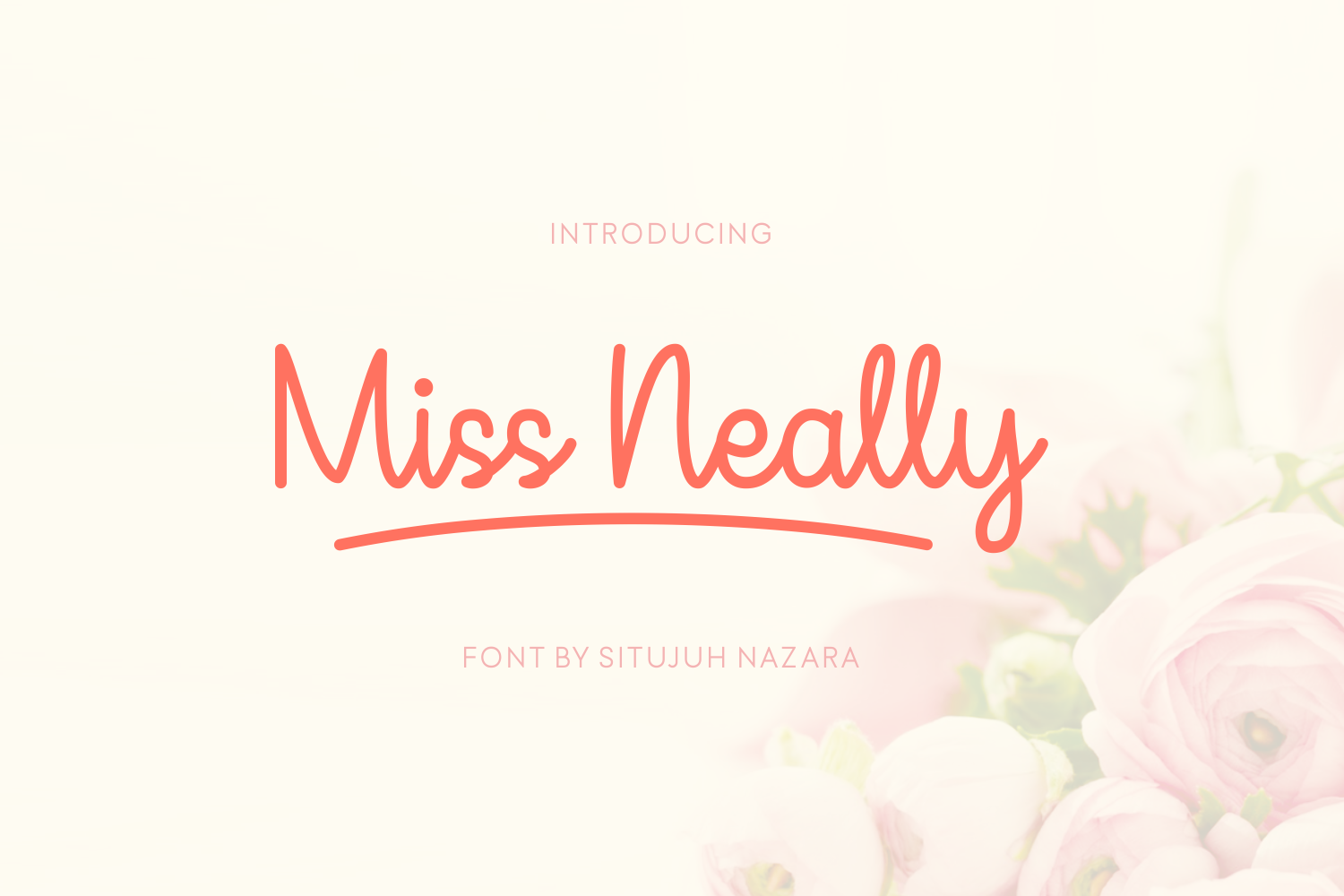
Miss Neally is a monoline script font, which means each stroke has a consistent thickness. This gives it a clean, modern look while still feeling handwritten and personal. The letters flow naturally, and the overall mood is refined without being stiff. Words like smooth and elegant describe it well, but it also carries a sense of warmth that works for many types of businesses.
One of the most useful features of Miss Neally is the inclusion of initial and terminal swashes for every character. These decorative flourishes let you add a touch of sophistication to the beginning or end of a word. You can use them sparingly for a subtle accent or more boldly for a dramatic effect. This flexibility makes Miss Neally suitable for both delicate labels and bolder brand statements.
Unlike some script fonts that feel overly ornate or difficult to read, Miss Neally strikes a balance between beauty and legibility. That balance is exactly what small business owners need when they want to look professional without sacrificing personality.
Bringing Your Brand Identity to Life
Your brand identity is more than a logo. It is the feeling customers get when they see your packaging, read your menu, or scroll past your Instagram post. Miss Neally can help create that feeling consistently across every touchpoint.
For a bakery, this font can evoke the handmade care that goes into each pastry. For a handmade candle business, it can communicate the artistry behind each scent. For a coaching practice, it can add a personal, approachable touch to digital materials. The key is that Miss Neally feels intentional. When customers see it on your website banner and again on your product label, they start to associate that look with your business. That repetition builds recognition and trust.
Real Business Examples
- Bakery or café branding: Use Miss Neally for your menu headers, logo, and thank-you cards. Pair it with a clean sans serif font for prices and descriptions to keep everything easy to read.
- Handmade product labels: Whether you sell soap, candles, or skincare, Miss Neally works beautifully on small labels. The swashes can frame your product name or ingredient list.
- Beauty and wellness packaging: A monoline script like this one adds a modern, premium feel to lotion bottles, serum boxes, or bath salts.
- Boutique and apparel: Use it for hang tags, shopping bags, and social media graphics. It gives off a curated, thoughtful vibe.
- Service-based businesses: Coaches, consultants, and wedding planners can use Miss Neally in their logo, website headers, and client welcome packets to look both professional and warm.
Each of these examples shows how a single font can unify different materials. Consistency like this helps a small business look more established and reliable.
Using Miss Neally Across Different Materials
A good font works hard across formats. Miss Neally performs well in print and digital settings, but it is important to use it wisely depending on the medium.
Logos and Business Cards
Miss Neally works well as a logo font, especially when you want a script that feels refined. Use it for your business name and keep the design simple. On business cards, the swashes can add a subtle flourish that makes the card feel special without overwhelming the information. Make sure your contact details remain easy to read by keeping them in a complementary sans serif or serif font.
Product Labels and Packaging
On product labels, readability matters a lot. Miss Neally is clear enough for short phrases, product names, and taglines. For longer ingredient lists or instructions, switch to a simple sans serif font. This keeps your packaging looking clean while still letting the script font shine where it matters most.
Social Media and Digital Graphics
Instagram posts, Pinterest pins, and Facebook ads all benefit from a consistent typography style. Use Miss Neally for headlines or quotes in your graphics. Because script fonts can be harder to read on small mobile screens, keep the text large and give it plenty of space. This is especially important for thumbnails or stories where viewers scroll quickly.
Menus, Flyers, and Printed Materials
For menus, use Miss Neally sparingly. It works well for section headers or the name of your establishment, but the body text should remain in a highly readable typeface. Flyers and brochures can feature the font in the main headline, then rely on a clean secondary font for details. This approach keeps your materials professional while still using the script font to set the tone.
Font Pairing for a Polished Look
Most small business owners are not typography experts, and you do not need to be. Pairing Miss Neally with a simple sans serif or serif font is straightforward and effective. A sans serif like Montserrat, Lato, or Open Sans will provide a clean contrast to the script style. If you prefer a serif font, something like Playfair Display or Garamond can create an elegant, timeless combination.
The goal is to let Miss Neally be the accent that draws attention, while your secondary font does the heavy lifting for longer text. This approach keeps your brand looking balanced and professional. Test a few combinations on a mockup of your website or packaging to see what feels right for your specific business.
Readability in Real Business Settings
Readability is not just about choosing a font. It is about how that font performs in the real world. Miss Neally is a monoline script, which generally offers better legibility than high-contrast scripts. Still, you need to consider where it will appear.
On small labels, keep the font size generous. On mobile screens, avoid using it for long paragraphs. On printed menus, make sure the ink does not bleed in a way that makes the swashes unclear. Always order a test print of your packaging or business cards before committing to a large run. This simple step can save you from expensive mistakes.
Miss Neally works best as a display font. Use it for headlines, logos, and short phrases where its elegance can stand out. Reserve simpler typefaces for body text, captions, and any content that needs to be scanned quickly.
Testing Before You Commit
Before you roll Miss Neally across your entire brand, test it in a few key places. Create a mockup of your logo. Design a single product label. Make a social media graphic. See how it feels next to your existing visuals. Ask a few customers or friends for their honest reaction. Sometimes a font that looks beautiful in isolation can feel out of place in your actual brand context.
Testing also helps you decide how much to use Miss Neally. Some brands benefit from using it as their primary logo font. Others prefer to use it only for accents or special editions. There is no right or wrong answer. The best choice is the one that makes your business look and feel the way you want it to.
Checking Commercial Licensing
Before you use Miss Neally on any products, packaging, templates, merchandise, or client work, check the commercial licensing terms. Not all fonts include the same usage rights. Some allow unlimited commercial use, while others require an extended license for certain applications like selling products with the font on the packaging or using it in digital templates.
As a small business owner, it is your responsibility to make sure you are using the font legally. A licensing misstep can lead to costly issues later. Always read the terms carefully and purchase the appropriate license for your specific use case. This is a simple step that protects your business and respects the work of the font creator.
Making Miss Neally Work for Your Business
Miss Neally is not going to solve every branding challenge you face. No single font can do that. What it can do is give you a versatile, elegant tool that helps your business look more consistent and intentional. When used thoughtfully, it can elevate your logo, packaging, social media, and printed materials without feeling forced.
Start small. Try it in one area of your business see how it feels. If it works, expand from there. If it does not quite fit, adjust the pairing or the scale. The best brands evolve over time, and your typography choices can evolve with them.
For small business owners who want a script font that feels smooth, elegant, and practical, Miss Neally is worth considering. It brings a handmade quality without sacrificing professionalism. And in a world where customers are constantly judging brands by their appearance, that combination is hard to beat.